





QR Codes & TV Ads – What We Can Learn From The Super Bowl Frenzy

By Tobias Funke, Vice President of Product, QR Code, at Bitly
If there is one thing we’ve learned from this year’s Super Bowl it’s that QR codes have gone mainstream. What started as a critical need for restaurants to do business, QR codes have moved beyond contactless connections and are increasingly being adopted by businesses of all types looking to connect real-life to digital — everything from real estate open houses to Covid test check-ins to wireless access in your hotel room.
Coinbase alone spent $13 million dollars on its Super Bowl ad — a simple, yet mesmerizing experience that garnered 20 million visitors and boosted its crypto app downloadsby 279%.
What’s more remarkable is the spillover effect on the overall market. In the 24 hours that followed, QR Code Generator itself witnessed a 7x spike in QR Code-scans and QR Code creations, a signal that brands and marketers are not just taking notice, they’re also taking action.
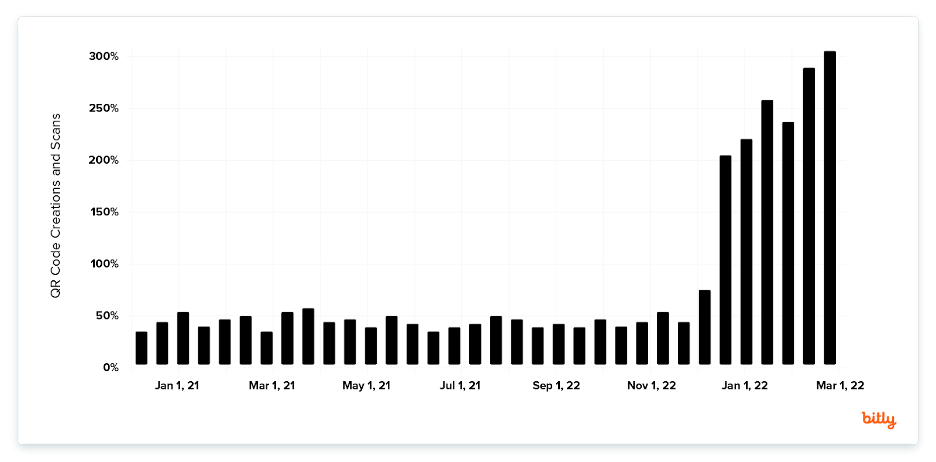
With the distance between your TV and your smartphone being only a short journey, embedding a QR code into your TV ad is a great way to take the viewer experience to the next dimension. With just one scan, you’re able to connect viewers to your products, services, and other platforms where they can experience a full digital experience and take action. Furthermore, QR codes have come a long way in terms of customization and functionality. They no longer need to just be monochromatic — meaning you don’t have to give them a dull prescriptive approach. You can now design them to fit your brand with a variety of creative tools.
Here are five best practices to follow when creating QR codes:
1. Add Instructions
One big mistake QR code users have made in the past is printing them without a short written explanation of what the consumer would gain or learn from scanning one. Make sure to incentivize your consumers to scan your TV QR code, or else all your marketing efforts will be for naught.
2. Frame It
With customizable frames, you can make your QR code complement your creative design. When generating your QR code, you’ll have a wide variety of ready-made frames with different Call to Action (CTA) messages and color options from which to select. If you want to add personalized details, you have the option of customizing it by choosing a different shape and icon — and even adding your own text.
3. Add a Logo Inside Your QR Code
Once you’ve selected a frame option and customized your QR code’s shape and color, make sure to incorporate a brand image or company logo at the center of your TV QR code. A more advanced solution will automatically detect the best and largest size for uploaded logos to make sure QR codes remain scannable, so you do not have to worry about making the correct adjustments.
4. Save your designs
Reuse the same, branded QR code design without fretting about recreating an old one manually. Choose a solution that allows you to save all your designs as templates so you can reuse them for any of your marketing or service endeavors.
5. Customizable URL
By default, more advanced QR code solutions will generate a random short URL that redirects to any page you want when the QR code is scanned. Make sure you choose one that you can customize to your preference, using your company’s name, for example, to help you stand out from competitors and build more trust among users.
As a versatile marketing tool, the QR code can be implemented in any campaign using any mass media platform. An ever-increasing number of mobile users means tapping into what is most convenient for an audience always on the go that expects a more frictionless brand engagement.
What’s more, it’s much easier to generate and scan now that the latest Android and Apple phones have integrated a QR code reader into their camera phone apps. They are the perfect marketing tool to connect TV viewership directly to your products and services.
You May Also Like
What the Dashboard Can’t Tell You About People Featuring Kerel Cooper of MarketCast
Joining us is Kerel Cooper, Chief Marketing Officer at MarketCast. Kerel shares why he believes marketers can learn from the strongest consumer brands and how human judgment should guide the use of AI in creative work.

Would You Share It If You Didn’t Work Here? Featuring Ty Stafford of Hello Party
Joining us is Ty Stafford, Founder and CEO of Hello Party, whose experience spans making YouTube videos in his dorm room and working at Red Bull Media House.

From the Conference Floor to the Boardroom: How Kindle Scribe Is Changing the Way Executives Capture Ideas
At Advertising Week New York 2026, Amazon’s Kindle Scribe offers a glimpse into how business leaders are combining the familiarity of handwritten notes with the convenience of digital technology to make the most of an increasingly demanding professional world.